


Realtime Stock Screener
4.6126.00 Reviews
App Specs
- Version
- 2.6.3
- Updated On
- License
- Free
- Downloads
- 10,000+
- Developer
- Real Time Stock Screener
- Categories
- Finance
- Platform
- Android
Screenshots
 Analysis by AppCompare
I find a stock app most useful when it helps me turn a vague hunch into a question I can actually check. Realtime Stock Screener is built around that kind of quick investigation: scan for trade candidates, follow market news, and keep an eye on conditions that may change during the day. It is a finance app from Real Time Stock Screener, and its focus is more on finding and monitoring stocks than on replacing a full brokerage account.
That distinction matters. I would use it as a research companion, not as a promise that a screen or alert can tell me what to buy. Market information is only useful when I have time to interpret it, and a fast-moving feed can just as easily add noise as clarity. The app makes the most sense for someone who wants a focused view of stocks while away from a desktop, and who is comfortable checking information against their own goals and risk tolerance.
Where a live connection matters
The app’s central appeal is its emphasis on current market activity, so the network is part of the experience rather than a background detail. Screening, news, and alerts are most useful when they reflect the moment I am checking them. If my connection is slow or unstable, I would treat what I see as a prompt to verify a detail before acting, not as a complete picture of the market.
That makes the app better suited to short research sessions than to watching every price movement continuously. I can open it to check a developing idea, see whether related news has appeared, and then put my phone away. Keeping that deliberate rhythm helps prevent a stream of updates from turning into pressure to trade. It also gives me a sensible answer to a common question: an alert can bring something to my attention, but it does not remove the need to check the underlying information.
A practical fit for phone-based research
The mobile format is handy when I have a few minutes between other tasks. For example, on a commute where I am safely seated, I might review a watchlist or use a screen to identify stocks worth researching later. I would not try to make a consequential decision while distracted, walking, or dealing with a patchy signal. A phone makes market information accessible; it does not make rushed decisions any wiser.
I also see a useful split between this kind of screener and a broker’s app. A brokerage app is usually where I would handle account-specific tasks, while a screener is for narrowing a broad field into a smaller set of candidates. If I mainly want to place trades or monitor holdings inside one account, my broker may be the more direct tool. If I want a separate place to explore ideas and follow market news, this app has a clearer role.
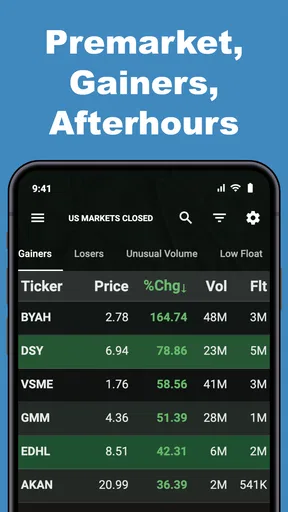
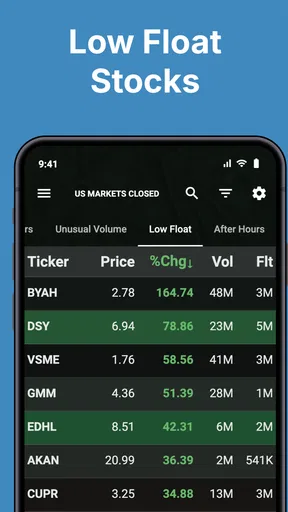
For someone new to investing, the screening concept can be helpful, but filters still need thoughtful use. A result that matches a chosen condition is not automatically a sound investment. I would start with one question at a time, such as whether I am looking for a particular type of company, and then research the names that appear instead of stacking many filters until the list looks reassuringly small.
Worth Reading Before You Choose

Flipboard Shows What News Apps Must Do Beyond the Feed

Switching to Android Auto Means Rethinking Your Driving Routine

Google Calendar Makes a Crowded Week Easier to Manage

Ludo King Makes the Most of the Minutes Between Plans

Baby Panda World Brings Quick Play to Modern Phones, but Its Game Library Feels Busy

ESPN’s Live Game View Makes Following Close Games Easier
Getting Started with Realtime Stock Screener
First things first, downloading the app was a breeze. Available for both Android and iOS, you can snag it from the Google Play Store or the Apple App Store. It’s lightweight, so it won’t hog your device’s storage, which is a big plus in my book.
Once you’ve got it installed, the setup process is straightforward. You’ll need to create an account, but don’t worry, it’s quick and won’t ask for anything too invasive. Right from the get-go, you’ll notice the app’s sleek design. It’s got a minimalist vibe, which I appreciate because it doesn’t distract you from what’s important: the data.
Diving into the Features
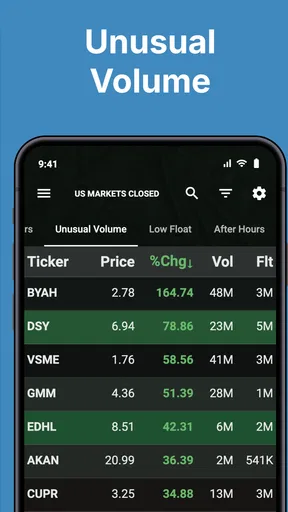
The Realtime Stock Screener is packed with features that cater to both novice and seasoned investors. One of its standout features is the ability to filter stocks based on various criteria. Whether it’s market cap, P/E ratio, or dividend yield, you can tweak the filters to your heart’s content. It’s like having your personal stock market genie.
Another cool feature is the real-time updates. Stocks are constantly moving, and the app ensures you’re always in the loop. I’ve used other apps where the lag was noticeable, but here, everything updates seamlessly. It’s particularly useful if you’re into day trading and need to make quick decisions.
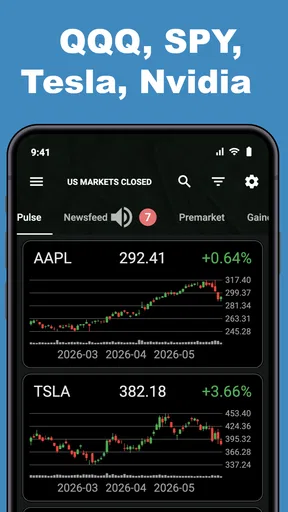
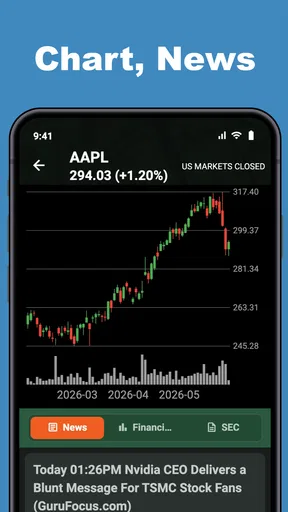
For those of us who love a good visual, the app provides detailed charts and graphs. They’re interactive, which means you can zoom in to get a better look at trends or zoom out for the bigger picture. It’s an intuitive way to keep tabs on how your stocks are performing.
User Experience and Navigation
Navigating through the app is a breeze. The developers have done a fantastic job of ensuring everything is where you’d expect it to be. The bottom navigation bar houses all the essential sections like Home, News, Portfolio, and Search. It’s a layout that feels familiar and doesn’t require a steep learning curve.
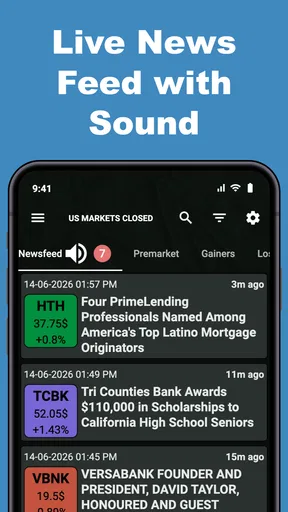
I also appreciate the news feed feature. It pulls in relevant articles and updates from various financial news outlets. This keeps you informed about market movements and potential impacts on your investments. It’s like having a financial advisor whispering insights into your ear.
Performance and Reliability
No one likes an app that crashes or hangs, especially when it involves your investments. I’m happy to report that the Realtime Stock Screener is rock solid. Throughout my use, I didn’t encounter any bugs or crashes. The app runs smoothly, which is crucial when you’re making investment decisions on the fly.
The app also doesn’t drain your battery, which is a relief. I’ve had experiences with other financial apps that turned my phone into a portable heater, but this one is gentle on resources.
Reading signals without overreacting
A useful screening habit is to write down why a result caught my attention before I open its chart. That small pause helps separate a genuine research lead from a stock that merely looks interesting because it is moving. I can then use the chart to inspect context rather than treating a short-term shape as a forecast. The combination of filters and visuals is most valuable when each tool answers a different question.
News deserves the same caution. A headline can explain why a stock is active, but it may be incomplete, delayed, or irrelevant to my own time horizon. I would read the article rather than rely on a title, then ask whether the event changes the business case or only the mood of the moment. That makes the news feed a starting point for research, not a substitute for it.
Alerts, interruptions, and recovery
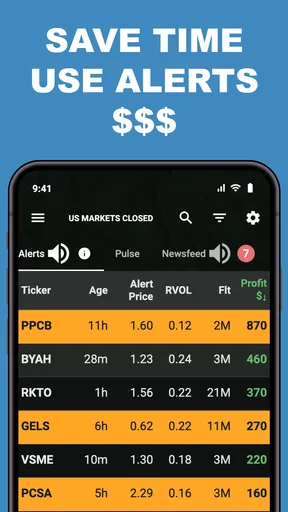
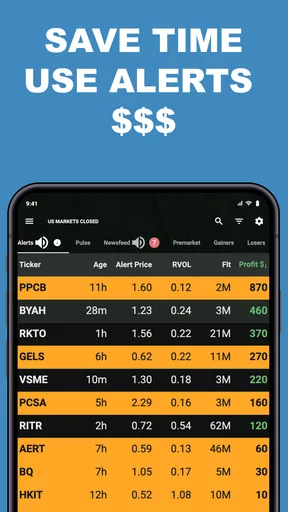
Alerts can help when I cannot keep the app open, but they also compete for attention. I would reserve them for conditions that matter to a plan I already have, rather than enabling every possible prompt. A narrowly chosen alert is easier to act on calmly; a phone that keeps buzzing can encourage impulsive checking without improving the quality of a decision.
If an update seems out of step with a chart or news item, my next step would be to refresh when the connection is stable and compare the information again before doing anything. I would also avoid assuming that a notification is a complete record of what happened. This is a practical limitation of relying on any network-dependent market tool: interruptions can affect when information reaches the phone, so important decisions deserve a second look.
For a normal day, I can imagine checking the app before work, saving a couple of promising names for later research, and returning during a lunch break to see whether the broader picture has changed. That is a more useful workflow than staring at prices all morning. It gives the screener a clear job—help me decide what deserves attention—without asking it to make the investment decision for me.
Using it thoughtfully on mobile data
Because the app is centered on live market information and news, I would use it with a reliable connection when timing matters. If I am trying to conserve mobile data, I can make visits purposeful: check the screen, open only the charts or articles relevant to my question, and leave the app when I have enough to investigate. I would not keep refreshing simply to feel more informed; repeated checking can use attention without adding useful context.
The same restraint helps on a small screen. A chart is convenient for a quick look, but detailed comparisons are easier when I can give them my full attention. I would use the phone to discover and monitor, then move to a larger display or another research source when I need to compare several companies, read long reports, or examine a decision closely. That is not a flaw unique to this app; it is a sensible boundary for mobile investing tools.
Cost, audience, and sensible alternatives
The app is free to install and is rated for Everyone, which makes trying its basic approach less of a commitment. It has a 4.6 average from around 690 ratings, and more than 10,000 installs. There are in-app purchases, with listed items ranging from $19.99 to $299.99, so I would check what a paid option includes and whether it solves a real problem for me before spending anything. A free download should not be mistaken for a guarantee that every feature or use is free.
Its current version is 2.6.3, it first appeared on August 8, 2020, and it runs on Android 6.0 or later. Those details make it easier to judge whether it fits an older phone, but compatibility alone does not determine whether the app suits someone’s habits. I would choose it if I want a dedicated stock-discovery tool; I would choose a broker’s built-in research if keeping everything in one place matters more, or a desktop platform if I need a broader workspace for deep analysis.
Realtime Stock Screener is especially appealing to curious investors who like testing ideas, following market developments, and building their own research routine. It is less suitable for anyone seeking personalized financial advice, a guaranteed signal, or a hands-off way to choose investments. Its filters can narrow the field, but they cannot account for every personal circumstance or replace careful reading.
Final Thoughts
All in all, the Realtime Stock Screener is a must-have for anyone interested in the stock market. Whether you’re a newbie just dipping your toes or a seasoned investor looking for a reliable tool, this app delivers. It’s feature-rich, easy to navigate, and most importantly, it’s reliable.
If you’re ready to take control of your investments and want a tool that keeps up with the fast pace of the stock market, give the Realtime Stock Screener a whirl. Trust me, you won’t regret it.
Pros
- User-friendly interface for quick navigation.
- Real-time updates with minimal delay.
- Customizable alerts for specific stocks.
- Comprehensive data analysis tools.
- Supports multiple stock exchanges.
Cons
- Requires a stable internet connection.
- Limited features in free version.
- Occasional glitches in older devices.
- No option for offline data viewing.
- High learning curve for beginners.
FAQs for Realtime Stock Screener
What is Realtime Stock Screener, and how does it work?
Realtime Stock Screener is a powerful tool designed for investors and traders to efficiently monitor and analyze stock market data. It provides real-time stock prices, customizable filters, and alerts to help users identify trading opportunities. The app integrates various financial indicators and charts, making it easier to track market trends and make informed decisions.
Is Realtime Stock Screener free to use?
Realtime Stock Screener offers a free version with basic features suitable for casual investors. However, for advanced analytics, real-time alerts, and premium indicators, a subscription plan is available. The subscription enhances the user experience with additional functionalities tailored for serious traders and investors looking for comprehensive market insights.
What features does Realtime Stock Screener offer?
The app provides a variety of features, including customizable stock filters, real-time price updates, technical analysis tools, and portfolio tracking. Users can set alerts based on specific criteria, access historical data, and use charting tools to visualize trends. These features are designed to cater to both novice and experienced investors.
Is Realtime Stock Screener available on both Android and iOS?
Yes, Realtime Stock Screener is available for download on both Android and iOS platforms. It offers a seamless experience across devices, allowing users to access their accounts and data whether they're on a smartphone or tablet. This cross-platform availability ensures that users can stay connected to the markets anytime, anywhere.
How user-friendly is Realtime Stock Screener for beginners?
Realtime Stock Screener is designed with user-friendliness in mind, featuring an intuitive interface that is easy to navigate even for beginners. The app includes tutorials and support resources to help new users understand its functionalities. With a few taps, users can customize filters and start screening stocks, making it accessible for those new to trading.


